Locations and times
Your own list of delivery locations, addresses, colours and available times. Disable a location to remove it from the choices.
Catering app
Customers order meals on your website. You see how many portions to prepare, where to deliver them and at what time.
Just share a link. Customers order in their browser without installing an app.
Free preview. Publish from PLN 49 net/month with annual billing.| Dish | 10:00 | 12:30 | Total |
|---|---|---|---|
| Chicken with rice | 25 | 17 | 42 |
| Potato and cheese pierogi | 0 | 0 | 0 |
| Tomato soup | 11 | 7 | 18 |
| Total | 36 | 24 | 60 |
Customers choose meals for specific dates.
A summary by dish, delivery time and location.
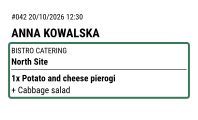
Labels with the customer's name, delivery date and location.
Managing orders
Foodyo works for daily lunches, workplace meals and deliveries to regular locations. Accepted orders appear in the kitchen summary. Choose a day, check the portions and print labels for packing.
Add dishes to the calendar. Copy a menu to the next day and set a portion limit when you can only prepare a certain quantity.
They choose dishes, dates, a delivery location and a time. They place the order on your website, including on their phone.
Open the summary for the day. See ordered dishes, variants and extras, grouped by delivery time and location.
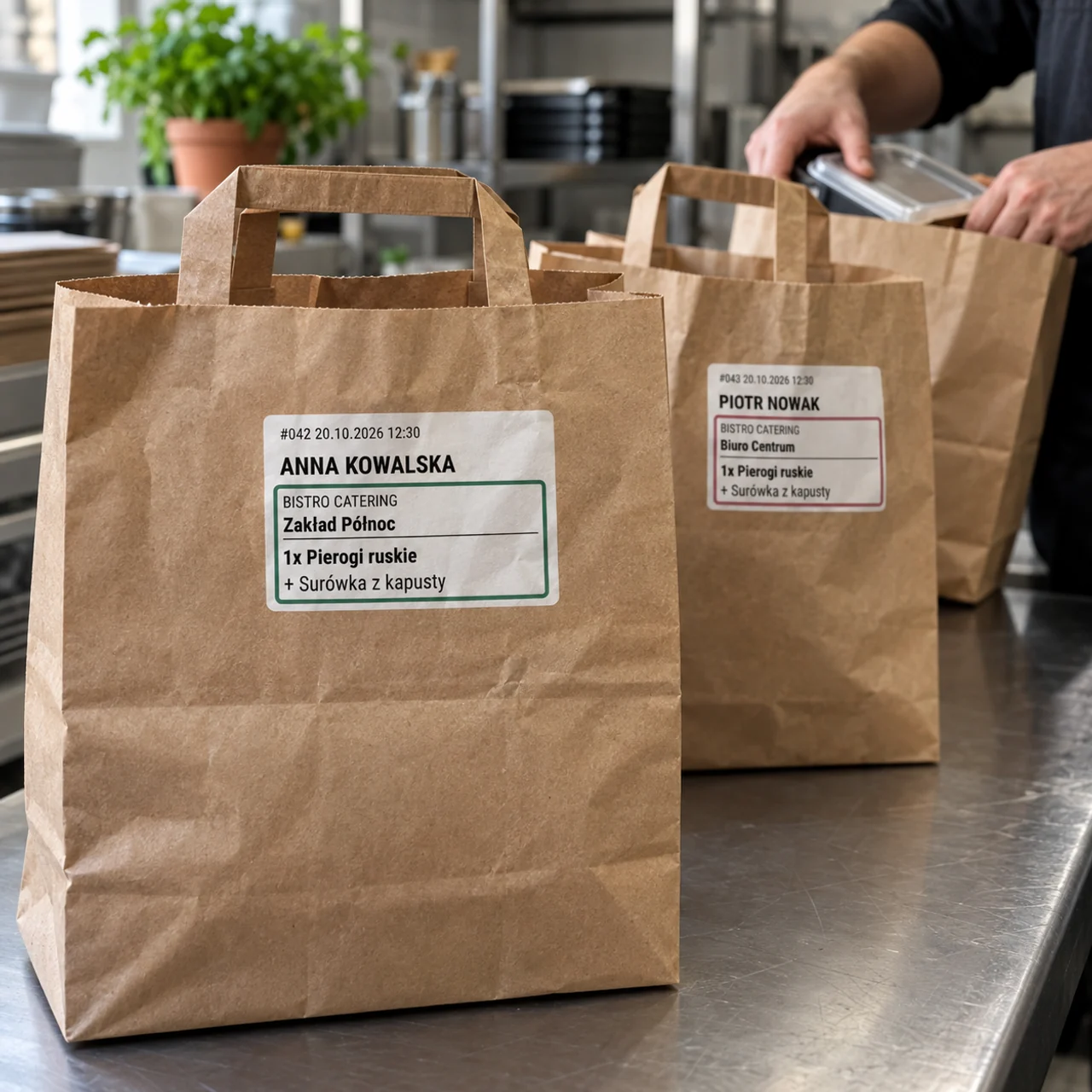
Print labels for individual portions or whole orders. Names and location colours help you sort the bags.
01 / Menus and dates
Assign dishes to dates in the calendar. Copy a prepared menu to another day. Customers choose a date and see the dishes available on it.
Set the time when orders close, on the previous day or the same day. Choose how far ahead customers can order.
Only making 20 sandwiches? Set a limit for the dish. It disappears from the menu when the allocation runs out. Availability is also checked when an order is placed, and customers cannot see your internal limits.
02 / Kitchen and deliveries
In the Catering tab, choose a day and group the summary by dish or location. Each column represents a delivery time. You can also filter it to one location or time.
Click a portion count to see the orders and customer names. The details include variants, extras and notes.
Enable automatic order acceptance. Orders paid online are accepted after payment is confirmed. You can also keep manual approval.
03 / Packing and printing
Choose a day, location and delivery time, then print the labels. Each can include the customer's name, ordered dish and delivery location. One label can cover a single item or the whole order.
Choose A4 or A3 and a label grid. Adjust label dimensions, margins, gaps and text. A single-label preview and a test sheet help you check the settings before printing.
Assign a colour to a location and enable a thicker coloured border on the labels. Recipient details stay readable, while bags are easier to sort for delivery.
When the content needs another label, the printout continues with the recipient's details. The panel tells you when orders span several labels.
Add delivery locations and times. Choose which form fields and payment methods to offer.
Your own list of delivery locations, addresses, colours and available times. Disable a location to remove it from the choices.
Show or hide the phone, email and notes fields in the order form.
Protect the website with a shared password and give it to your customers.
BLIK and card payments online, or payment on receipt. Customers get a view of their order and its status.
Menus, orders, the catering panel, summaries and labels. Choose your website address and billing cycle.
Your website addressyourname.foodyo.pl
PLN 588 net paid upfront for the year
Or PLN 59 net with monthly billing.
Your website with a .pl domain includedyourname.pl
PLN 1188 net paid upfront for the year
Or PLN 109 net with monthly billing.
Choose your plan and address when publishing. Creating a preview is free.
0% commission on orders paid on receipt. Online payments carry a total fee of 2%: 0.85% for HotPay and 1.15% for Foodyo. Subscription prices exclude VAT.
For caterers and restaurants selling daily lunches, workplace meals or food delivered to regular locations. Each customer chooses their own dishes and dates. In this mode, delivery is to locations on your list, such as an office or workplace. Foodyo does not plan diets or calculate calorie targets.
No. Foodyo runs in a browser on phones, tablets and computers. Send customers a link to your website. They open the menu, choose a date and delivery location, and order without downloading an app. Your management panel also runs in a browser.
Yes. They choose available dates and dishes from the menus assigned to those dates. You decide how far ahead they can order and when orders close for each date.
Yes. Set a limit for a dish on a specific day in the calendar, for example 20 sandwiches. The dish becomes unavailable when the allocation runs out. Availability is also checked when an order is placed. Customers cannot see the limit or the internal portion count.
Yes. The Catering tab has Preparation and Deliveries views. Choose a day, optionally a location and time, and check the totals. Click a number to see the orders and recipients.
Yes. For batch printing, choose a label per item or per whole order. You can sort labels, filter locations and times, and add a border in the location's colour. Adjust the A4 or A3 sheet layout to match your label paper.
No. Catering mode lets you enable automatic acceptance. Online orders are accepted after payment. With manual approval, you decide on each order in the panel. Once an order has been accepted, the customer cannot cancel it themselves.
In catering mode, you can hide phone, email and notes fields. This keeps the form short, for example when you deliver bags to a regular location and identify recipients by name.
The Start plan costs from PLN 49 net per month with annual billing, or PLN 588 net per year. Monthly billing costs PLN 59 net. Orders paid on receipt have no commission. The total fee for online payments is 2%: 0.85% for HotPay and 1.15% for Foodyo.
Yes. Your website shows your brand, menu and photos. Start includes an address under foodyo.pl, while Pro includes your own domain. Edit the website's appearance in the builder and manage daily menus and orders in the panel.
Create a website preview and add your menu. Enable Catering in settings, enter delivery locations and times, and plan dishes in the calendar. Before sharing the link with customers, check the offer, payments and a test printout. The preview is free. Choose your subscription when you publish.
Add dishes and see your website. The preview is free; choose a subscription when you publish.